
Space Bar Clicker





Space Bar Clicker looks like the simplest possible idea for a game: one key, one counter, nothing else. What it actually demands, once the numbers start climbing, is a constant decision about where your next point should come from — your own finger, or an upgrade you haven't bought yet. Space Bar Clicker never stops being a one-button game on the surface, but the layer underneath it is pure resource management.
The One Key That Starts Everything in Space Bar Clicker
Every run of Space Bar Clicker begins the same way: press the spacebar, get a point. There's no tutorial beyond that, because there doesn't need to be one. The first few dozen presses are entirely manual, and the only real skill on display is how fast you can physically tap a key, which is exactly the joke the game is built on.
What changes the shape of the game is the moment a player stops treating that manual tapping as the whole point and starts treating it as seed capital. Early points exist to be spent, not hoarded, and the players who cling to manual clicking past the first upgrade purchase are the ones who plateau earliest.
That first purchase decision — save a little longer for a bigger upgrade, or buy something cheap immediately — turns out to matter more than it looks like it should, since every subsequent upgrade in the game builds on whatever base rate you already have.
Upgrade Keyboard and the Doubling Rhythm
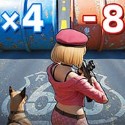
Upgrade Keyboard is the upgrade that defines Space Bar Clicker's early pacing: it doubles the value of every press, turning a press worth 2 points into one worth 4, and the next purchase turns that 4 into 8. That doubling pattern repeats, and because it applies to manual presses directly, it rewards players who are still actively tapping rather than only those who have moved on to automation.
The doubling rhythm also creates a natural checkpoint feeling — a session where every tap is worth 8 points plays very differently from one where taps are still worth 2. Players chasing efficiency tend to prioritize this upgrade early precisely because its effect compounds with everything bought afterward.
Critical Hit Chance and the Lucky Press
Critical Hit Chance introduces the one part of Space Bar Clicker that isn't purely deterministic: a percentage chance that any given press lands as a lucky hit worth extra points. It's a small addition mechanically, but it changes the feel of manual clicking from a flat grind into something with occasional payoff spikes, which is part of why players keep tapping by hand even after automation upgrades are available.
For players who enjoy active clicking rather than letting the game run passively, Critical Hit Chance keeps manual play relevant deep into a session instead of becoming busywork next to the automated helpers.
Millennials Upgrade and Early Automation
The Millennials Upgrade is one of the early steps toward taking the player's finger out of the equation, providing steady assistance with pressing the spacebar rather than requiring constant manual input. It's not the fastest automation in the game, but it's the one that establishes the idea that Space Bar Clicker doesn't require your attention every second to keep producing points.
This is the point where the game quietly splits its audience: players who keep clicking manually alongside automation for maximum output, and players who let it run and check back periodically.
Sleepy Ant and the Helper Ladder
The helper system starts small, literally: the Sleepy Ant is the first automated presser in Space Bar Clicker, tapping the spacebar once every two seconds on its own. It's a modest rate on paper, but it's the first taste of points accumulating without any input from the player at all, and that shift changes how a session gets played from that point forward.
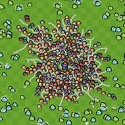
Later helpers scale dramatically past the Sleepy Ant's pace, climbing to presses numbering in the hundreds and eventually thousands per second as a player saves up for them. The gap between the Sleepy Ant's lazy tapping and those later helpers is part of the game's core progression loop, and it's also where the game's sense of humor lives — the visual escalation goes from a drowsy insect to increasingly frantic, exaggerated characters slamming the key on the player's behalf.
Reading the Helper Visuals as Progress Markers
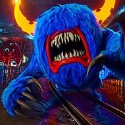
Space Bar Clicker uses its helper roster as a visible progress indicator as much as a mechanical one. A furious character smashing keys and an alien machine tapping at what the game describes as warp speed aren't just flavor, they're a rough signal of how far into the upgrade tree a player has gotten without needing to check a menu. Long-time players use these visual shifts almost like milestones, associating a particular helper's appearance with roughly where they are in a run.
That escalation also sets expectations for what's coming next — once a player has watched the roster go from a single ant to a crowd of increasingly unhinged pressers, the appeal of the next purchase isn't just the number, it's seeing what the game does visually to top the last one.
Idle Habits in Space Bar Clicker: Clicking, Buying, or Walking Away
Because Space Bar Clicker is built as an idle incremental game at its core, points keep accumulating whether or not a player is actively pressing anything, as long as helpers are in place. That single fact shapes three distinct playstyles: constant manual tapping stacked on top of automation for maximum output, periodic check-ins to spend accumulated points, and long idle stretches where the game runs untouched in a background tab.
None of those approaches is objectively correct. What the game does reward, consistently, is not letting accumulated points sit unspent — every purchase, from Upgrade Keyboard's doubling to the next helper up the ladder, raises the ceiling on everything that comes after it.
Does clicking manually still matter once you have helpers?
Yes — Upgrade Keyboard's doubling effect and Critical Hit Chance's bonus rolls both apply specifically to manual presses, so a player who keeps tapping the spacebar by hand alongside their automated helpers is still adding meaningfully to their point total rather than just watching numbers tick up on their own.
What's the first automated helper in Space Bar Clicker?
The Sleepy Ant is the entry point into automation, pressing the spacebar once every two seconds without any player input, and it's the upgrade that introduces the idea of points accumulating passively before the faster, higher-tier helpers become available.
Why does Upgrade Keyboard matter more than its price tag suggests?
Because it doubles the point value of every manual press — 2 becomes 4, then 8 on the next purchase — its effect compounds with every other upgrade bought afterward, which is why players who prioritize it early tend to out-pace those who spend on other upgrades first.
Space Bar Clicker stays a one-key game from the first press to the last, but the path from a Sleepy Ant tapping once every two seconds to a warp-speed alien helper is where the actual game lives. Anyone who has watched their run go from manual spacebar mashing to a screen full of automated pressers knows the joke is the same key the whole way through — it just stops needing your finger to press it.